

FileMaker 2025 includes a whole host of new features — plenty of glitzy headline items like AI integration and Claris Studio.
But two additions that haven’t received nearly as much attention are the new GetRecordIDsFromFoundSet function and the “Go to List of Records” script step. When used together, they fundamentally change how we can store, pass, and recreate found sets, and they unlock workflows that simply weren’t practical before.
Two real-world use cases stand out.
Cleaning Up Navigation Without Relationship Bloat
During normal development, many of us rely on a familiar technique: we create a relationship between a global text field on one side and a primary key on the other, load that global field with a list of record IDs, and then use the relationship to navigate to a specific group of records.
It works, but over time it creates problems. Relationship graphs become cluttered, global fields multiply, schema complexity increases, and performance can suffer. In larger systems, this kind of structural overhead adds up quickly.
With FileMaker 2025, we can now accomplish the same thing without the extra relationship or the global field. Instead of relying on schema to hold navigation state, we can store found sets directly as record IDs and reconstruct them on demand.
The Back Button FileMaker Users Have Always Wanted
FileMaker developers have been asking for a true back button for a very long time. I’d say since the first release, but FileMaker actually predates the web browser — so let’s call it since FileMaker 3.0.
There have been ways to approximate browser-style navigation in the past, but they were rarely simple or performant. They required complex scripting, fragile assumptions, and constant maintenance. As one of my colleagues often says, the juice wasn’t worth the squeeze.
Until now.
Thinking in Stacks Instead of Screens
Before diving into FileMaker specifics, it helps to step back and think about how navigation actually works.
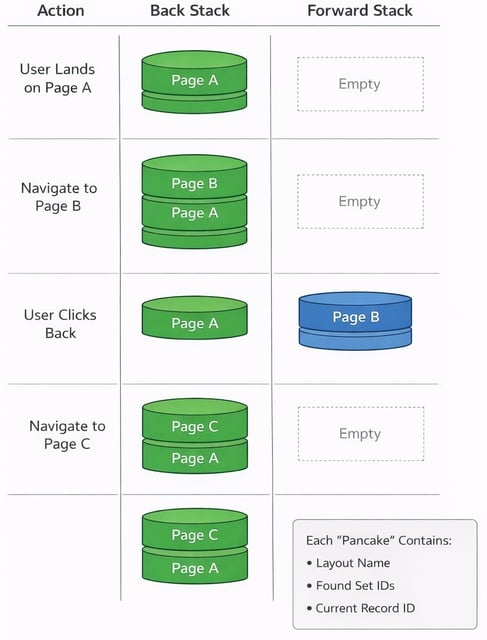
The simplest model is two stacks of information — similar to two stacks of pancakes. One represents where the user has been (the Back stack), and the other represents where they can return to (the Forward stack).
Each “pancake” is a snapshot in time that captures exactly where the user is. That snapshot contains the current layout, the full found set, and the current record. Every time the user navigates somewhere new, a new snapshot is created and added to the Back stack.
If the user clicks Back, the current snapshot is moved to the Forward stack and the previous one is restored. If the user navigates to a brand-new location instead, the Forward stack is discarded entirely. This is a long-established convention in browsers, and it prevents confusing behavior where “Forward” leads to screens that no longer make sense.
Capturing a Snapshot in FileMaker
Each snapshot is stored as a single JSON object containing the layout name, the IDs of every record in the found set, and the record ID of the current record.
|
JSONSetElement ( "" ; ["layout" ; Get ( LayoutName ) ; JSONString] ; ["ids" ; GetRecordIDsFromFoundSet ( JSONStringRanges ) ; JSONString] ; ["current" ; Get ( RecordID ) ; JSONNumber] ) |
The key piece here is GetRecordIDsFromFoundSet. This function allows us to capture the entire found set in a form that can be stored, passed, and later reconstructed.
The most efficient format is JSONStringRanges. Instead of storing every record ID individually, consecutive IDs are compressed into readable ranges — for example, IDs 3, 4, 5, and 6 become 3-6. This dramatically reduces the size of the JSON payload and makes navigation faster and easier to process.
When the Snapshot Runs
This snapshot is captured automatically using an OnRecordLoad script trigger. Every time the user navigates normally, we record where they’ve been.
One important exception is when the user clicks the Back or Forward buttons. In those cases, we intentionally bypass the snapshot script so that the navigation stacks can be managed manually. Those scripts require a bit more logic to keep everything aligned correctly.
One Small Schema Change
Although FileMaker provides the Get ( RecordID ) function, it doesn’t expose that value as a field we can search or navigate to directly.
To solve this, each table that participates in navigation needs a calculation field that simply returns the record ID. Once that exists, we can reliably move back to the exact record the user was viewing at the time the snapshot was taken.
How the Back and Forward Buttons Work
The Back and Forward scripts do three essential things.
First, they recreate the found set using the new Go to List of Records script step, passing in the record IDs that were previously captured.
Second, they actively manage the two stacks. Going back moves the current snapshot onto the Forward stack; going forward moves it back onto the Back stack. Each time, the current location is removed so the stacks remain accurate.
Finally, after the found set is rebuilt, the script determines where the target record sits within that found set and jumps directly to it using Go to Record. This is done using GetRecordIDsFromFoundSet a second time, combined with a simple position calculation.
Getting Up and Running Quickly
If you want to implement this immediately, the process is straightforward.
Create the recordID calculation field in each table involved in navigation. Copy the three scripts — CaptureState, BackButton, and ForwardButton — into your solution. Attach CaptureState to the OnRecordLoad script trigger. Then create a button bar with Back and Forward buttons and place it on the appropriate layouts.
From there, you can refine the behavior as much or as little as you like.
Sample File
We’ve included a fully working sample file that demonstrates this entire approach, including stack management, script triggers, and navigation buttons. You’re welcome to copy it directly into your own solutions and adapt it as needed.
And if you’d rather not tackle this yourself — or if you’re looking for help designing, optimizing, or modernizing your FileMaker systems — feel free to contact us. We’re always happy to help you get more performance, stability, and usability out of your FileMaker solutions.